
Appearance
JTBD Insights: why customers buy, from their reviews
Nexus reads your reviews and writes down the job each product does for the customer. Open it at Insights > Products and select the JTBD Insights tab.
JTBD means "jobs to be done". A job is the reason a customer "hires" a product.
Problem and intended user
The creative strategist (the person who plans and makes ad creatives) needs to know why people buy a product. Otherwise an ad can promise wellness to customers who want relief from a problem. The ecommerce manager (the person who runs the store) asks the same when picking products to push.
Current workflow
You read reviews in the review app's own dashboard, or export them to a spreadsheet, and group quotes by hand into angles for new ads.
Prerequisites
- A review platform connected, or a CSV file imported. See Review apps and CSV import.
- Reviews matched to your products. A review with no product adds nothing here.
How Nexus works
From the text of your matched reviews, AI writes the jobs, the struggling moments, the outcomes, the confidence rating and a first Vitamin to Painkiller score. On the aggregated page, AI also groups similar jobs. Fixed rules then adjust the score by confidence, set the labels and count the jobs. Review sync and product matching must finish first.
Flag, mark done and archive
Three icon buttons at the right of each card track your work. Hover over one to read its label. The label changes after you click.
| Button | Then reads |
|---|---|
| Flag as priority | Remove priority flag |
| Mark as done | Mark as not done |
| Archive | Unarchive |
Above the cards, three groups narrow the list: Active or Archived; All, Flagged or Not flagged; All, Done or Open. The filters above the tabs also apply: search, Collection, Category and Quadrant.
Recompute Data
INFO
Recompute Data does not use your credits, but limits apply.
Recompute Data refreshes the combined view. It also re-reads products whose reviews changed. It does not rebuild every product.
The Update data menu on Insights > Products does not refresh JTBD Insights. Use Recompute Data.
- Click Recompute Data.
- Wait. The button shows progress. You can leave the page while the job runs.
Exact output
The product card
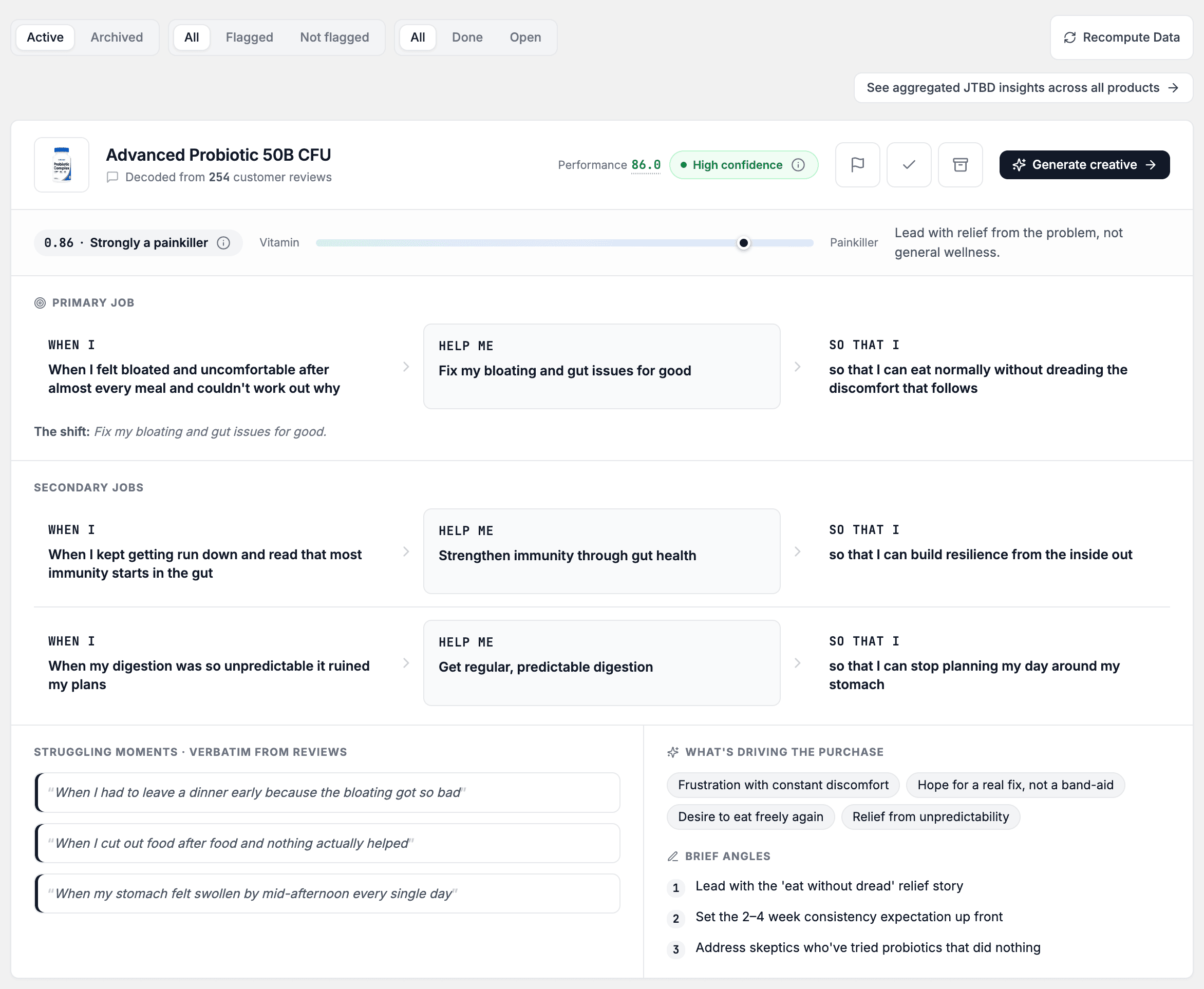
The tab shows one card per product. Each job is a short story in three parts: When I (the situation), Help me (the job) and So that I (the outcome). The card says Decoded from a number of customer reviews.
The header shows the product, a Priority pill for a flagged card, the product's Performance score and a confidence pill. Performance is the product's Performance Score, the same number as in the Product List. A product with no Performance Score yet shows a dash. Select the score to open Performance Score weights. A dash opens nothing.
A Vitamin to Painkiller bar follows. Below it you find:
- Primary job: the main job. A line called The shift can follow it.
- Secondary jobs: other jobs, in the same three parts.
- Struggling moments · verbatim from reviews: review quotes. The card shows the first few and prints +N more in source reviews for the rest.
- What's driving the purchase: tags for the feelings behind the purchase.
- Brief angles: numbered ideas for ad messages.
Cards with the strongest painkiller score come first. The tab has no sort control. Click Load more to see further products.
Click Generate creative to open the Creative Wizard with that product selected. See Generate a creative batch.
Confidence
Each card shows High confidence, Medium confidence or Low confidence. It rates the review evidence, not the product. Many reviews that say the same thing raise it. Few, short or mixed reviews lower it. Still read low-confidence jobs, which have less evidence behind them.
Confidence also pulls the Vitamin to Painkiller score toward the middle. Low confidence pulls it the most. High confidence leaves it as it is.
Vitamin to Painkiller
A painkiller fixes something that hurts. A vitamin improves something that is already fine. Neither end is better. The score shows which ad angle to lead with.
| Label on the card | What it means |
|---|---|
| Strongly a painkiller | Customers buy mainly to fix a problem. |
| Leans painkiller | Relief from a problem outweighs wellness. |
| Balanced | Relief and wellness weigh about the same. |
| Leans vitamin | Wellness outweighs relief from a problem. |
| Strongly a vitamin | Customers buy mainly to improve something that is already fine. |
For the two painkiller labels, the card suggests you lead with relief from the problem. For the other labels, it suggests you mix relief with wellness and prevention.
The aggregated page
Click See aggregated JTBD insights across all products. The page that opens is also called JTBD Insights. Click Back to Product Intelligence to return.
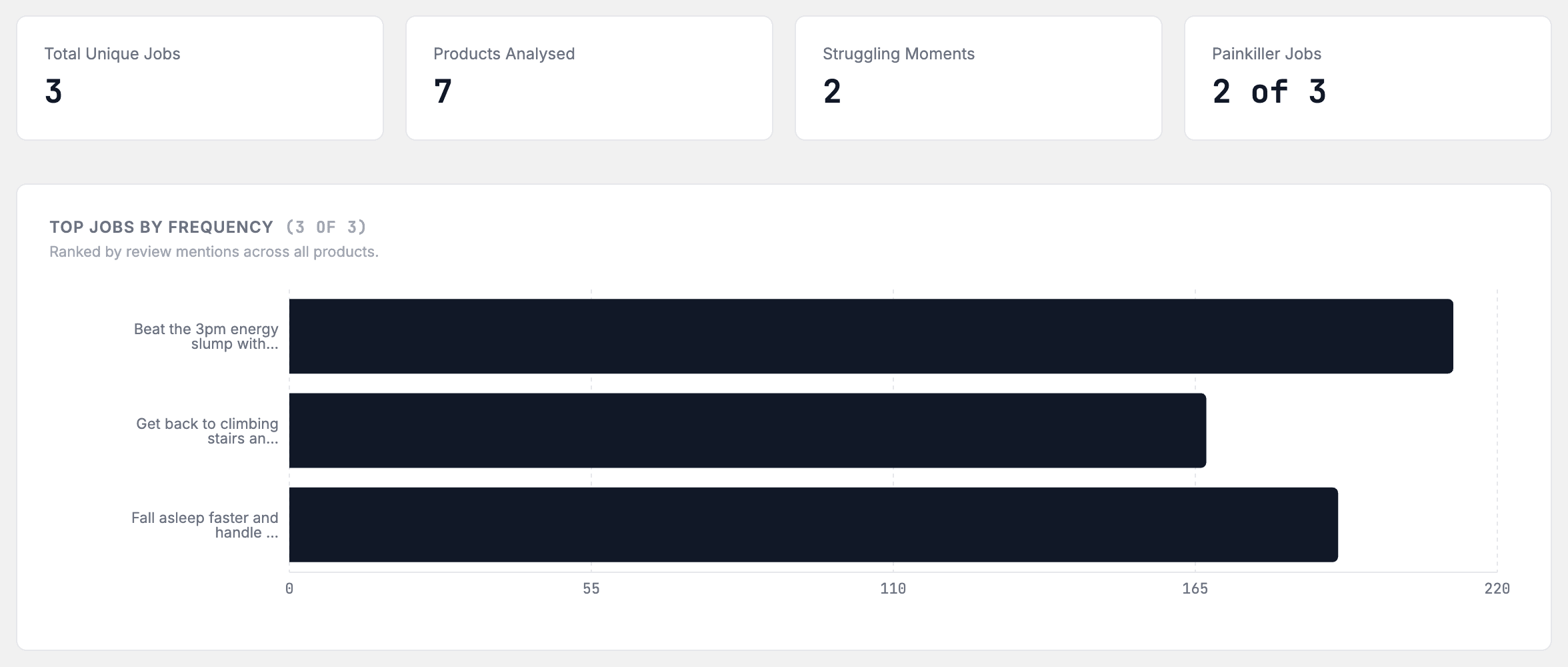
Four cards sit at the top: Total Unique Jobs, Products Analysed, Struggling Moments and Painkiller Jobs (for example "3 of 12"). A job that belongs to one product, with one wording, is not in Total Unique Jobs.
| Section | What it shows |
|---|---|
| Top Jobs by Frequency | Jobs ranked by review mentions |
| Job Stories | Each top job in three parts |
| Struggling Moments | Problems customers describe, with a severity tag |
| Desired Outcomes | Outcomes customers want |
| Unmet Needs | Need, Source (complaint or feature request), Reviews, Trend, Products |
| JTBD-to-Product Mapping | Which products share a job. Use Search products… to find one. |
| JTBD Trends Over Time | Share of mentions per period. Switch Quarterly or Monthly. Emerging and Declining tags mark jobs on the move. |
The Trend arrow shows rising, falling or steady mentions.
What to do with it
| What you see | Decision or action | Owner |
|---|---|---|
| Brief angles on a card | Pick the angle for the next ad. Click Generate creative. | creative strategist |
| A Vitamin to Painkiller label | Follow the card's suggestion on how to lead the ad copy. | creative strategist |
| Struggling moments quotes | Reuse the customers' words in ad text, outside Nexus. | creative strategist |
| Unmet Needs and Emerging jobs | Review your range and listings, outside Nexus. | ecommerce manager |
Expected value and measurement
This view can help you choose a message that matches why people buy. It changes no ad.
To check an angle, open Performance > Ad performance, select By angle and compare the closest matching group with other groups over the same dates. The groups are not the same list as Brief angles, so do not expect an exact label match. A price change or sale in the same weeks hides its effect.
Limitations and exceptions
- AI writes the jobs, quotes, angles and confidence ratings from review text. They can be wrong. Read the quotes before you act.
- The Vitamin to Painkiller score is an estimate.
- The aggregated page can show Showing partial results — semantic clustering temporarily unavailable. The insights may be less precise until the next recompute. Click Recompute Data later.
When the page is empty or old
| What you see | What to do |
|---|---|
| Import reviews to see jobs to be done | Connect a review platform. |
| Your reviews are still being analysed | Wait. The page updates on its own. |
| We couldn't finish analysing your reviews | If Nexus says it will try again, wait. If not, click Recompute Data. If it fails again, contact support. |
| Your reviews don't match any of your products | Check that your review platform and your store are the same shop. Then sync again. |
| No jobs-to-be-done insights yet | Reviews are in. Click Recompute Data. |
| No insights in this collection yet | Pick another collection. |
| No insights match these filters | Adjust or clear the filters. |
| No products match your search | Clear the search. |
| Your newest review is N days old. These insights may not reflect what customers say today. Check that review sync is running. | Click Check review sync. |
Nexus shows no fixed number of reviews that a product needs. A product with few reviews gets a card with Low confidence.
In Demo Mode
Flag, done and archive work. Recompute Data starts nothing. A red notice reads "JTBD recompute is disabled in demo mode." The page can also show the toast Failed to start recompute.